Heading off this December? How to set up your solar before you leave
Planning to get away this December? While you’re switching off, your solar system keeps working. A few minutes of setup before you lock the door means it works the way you want while you’re away.
Here’s a simple checklist to run through before you go.
Why it’s worth five minutes
An empty house uses far less power. The fridge, alarm, cameras and gate motor keep running, and not much else does. That gives your system plenty of sun to work with and makes it easy for your battery to stay topped up.
So the real question is what matters more to you while you’re away: keeping your bill as low as possible, or having the most backup power if the grid goes down. Either is a fair choice, and you can change it whenever you like.
Step 1: Choose your battery backup level
Your battery backup level sets the lowest level your battery will normally drop to while the grid is on. The higher the minimum, the more power you have in reserve for an outage. The lower the minimum, the more of your battery goes towards saving you money. You can change it in the customer zone (Stage Zero App) under Services. Select your product, scroll down to Battery SOC and click Update.
What does SOC mean? SOC stands for state of charge. It’s how much energy is in your battery at any moment, shown as a percentage of its full capacity, from 0% to 100%. While solar or grid power is available, your system keeps your battery at or above the level you choose. During a power outage, your home runs on that stored energy until the battery reaches 10%. The system then shuts down until solar or grid power is back to recharge it.
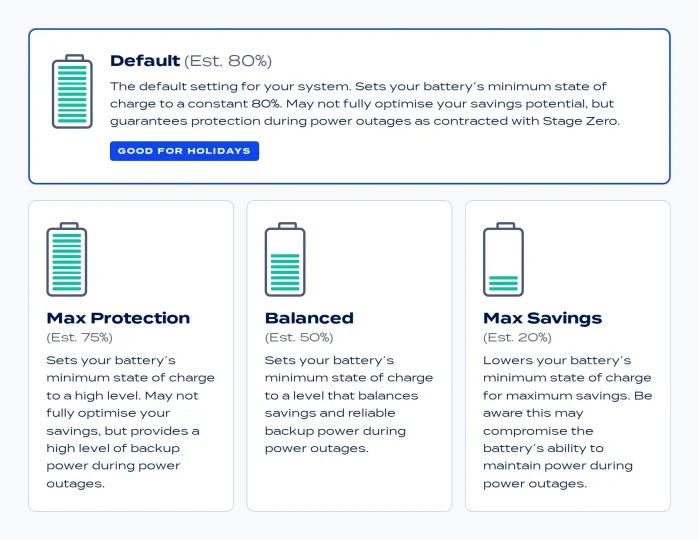
You’ll see the Default setting at the top, followed by three other options:
- Default (Est. 80%). Always keeps your battery at a minimum of 80%. This gives you the most backup power of any setting, with smaller savings.
- Max Protection (Est. 75%). Calculated from how your home uses power, so it keeps enough in the battery to see you through a long outage. More backup power, smaller savings.
- Balanced (Est. 50%). Also calculated from your home’s usage. It balances savings with reliable backup power.
- Max Savings (Est. 20%). Always lowers the minimum to 20%, the lowest setting, for the biggest savings. Your backup time will be shorter.
Default and Max Savings are fixed at 80% and 20%. Max Protection and Balanced are worked out from your own usage, so the percentage is different for every home and can shift over time. The percentages shown in the customer zone are estimates.
Our holiday tip: With the house empty, your solar should cover what your home needs on sunny days and keep your battery topped up, so a higher backup level costs you very little in savings. If you want the peace of mind, switch to Default while you’re away. It keeps 80% in reserve, so your alarm, cameras, gate motor and fridge can keep running for much longer if there’s an outage while nobody’s home. If saving matters more to you, stay on your usual setting. A quiet house makes your battery go further whichever setting you use. Switch back when you get home.
Step 2: Switch off what you don’t need
Less waste means more power where it counts. Before you leave:
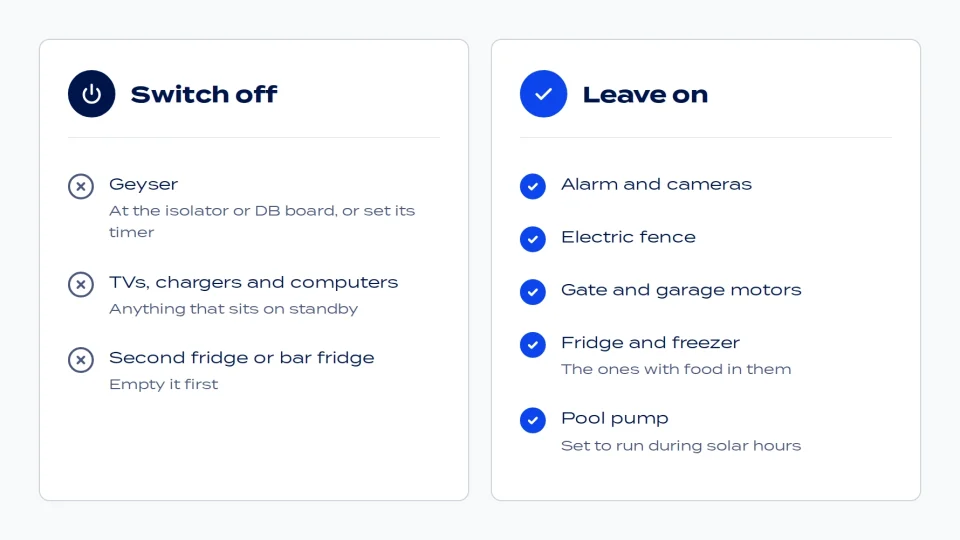
- Switch the geyser off at the DB board or isolator and switch it back on when you get home. If you’d rather it be ready when you walk in, leave it powered and set the geyser timer to come on a few hours before you arrive.
- Unplug TVs, chargers, computers and anything else that sits on standby
- Empty and switch off the second fridge or bar fridge
Leave these on:
- Alarm, cameras and electric fence
- Gate and garage motors
- The fridge and freezer with food in them
- Your pool pump, set to run during solar hours
Keep your pool pump running while you’re away, so the water stays clean in the summer heat. Set it to run during the sunniest part of the day, so it runs on solar rather than your battery. If it isn’t on a timer, it’s worth getting one fitted before you go.
Step 3: Check your system is healthy
Log in to the customer zone and take a quick look. Are your panels producing during the day? Is your battery charging? Are there any alerts?
If something looks off, get in touch now rather than finding out from your holiday spot.
Step 4: Set up battery notifications
In the customer zone, you can choose to get a notification when your battery drops below a certain level, such as 25%, 30% or 50%. Switch these on before you leave and you’ll get a heads-up on your phone if your battery runs low, and you can change your backup level remotely. If you’ve switched to Default, a 50% or 30% alert is a good sign the grid has been down for a while.
Step 5: Know who to call
If anything comes up while you’re away, our service centre is here to help, 24/7, right through the festive season. Save these details before you go:
- Phone: 087 162 5000
- Email: support@stagezero.co.za
Heading somewhere off-grid? Take backup power with you
If you’re going camping or on a long road trip, your home system stays behind. That’s where a portable backup power solution comes in.
The Volta 700X is our portable power station. It gives you 537Wh of power and up to 700W output, and at about 6.5kg it has a handle and is light enough to take anywhere the road takes you. You can charge it from the wall, from your car or with a solar panel (not included), so it keeps going off-grid too.
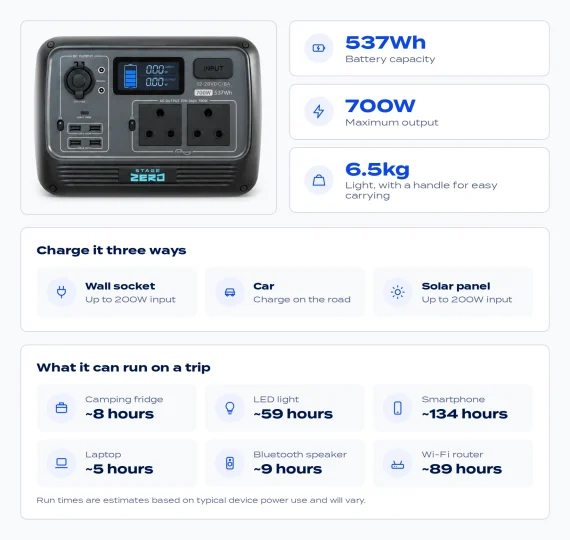
NIt also has wireless charging, multiple ports and an eco-mode that keeps you going longer. With your monthly subscription, maintenance and upkeep are covered, and you get a replacement guarantee and 24/7 support (Ts & Cs apply).
When you get home
Switch the geyser back on, plug in what you unplugged and set your battery backup level back to your everyday setting. You can change it as often as you like.
Then enjoy walking into a home that’s been looked after the whole time.
Not on solar yet?
Start the new year with power you can count on. Tell us how you use electricity and we’ll tailor a system around it.